Blender Market is a rich marketplace with digital assets, tools, and add-ons created for the Blender user community. It is a treasure trove of resources for 3D artists and digital creators looking to add a touch of quality to their projects. But what if the product you buy doesn’t live up to hype expectations? Can you return it?
The short answer is yes — with certain rules and caveats. In this blog, we will cover Blender Market’s return policy, how to process a return, common issues you may experience, and some best practices to create a smooth return.
Understanding Blender Market’s Return Policy
Image Source. Before starting a return on Blender Market, it’s vital to understand the platform’s return policy. The policy guides toward fairness for both buyers and sellers and provides for a transparent and pleasant shopping experience.
Conditions for Returns
Blender Market allows returns under specific conditions. Some common reasons for returns include:
- The product is defective or not functioning as described.
- The product does not match its listed description or preview.
- The buyer faces compatibility issues that were not disclosed at the time of purchase.
It’s important to note that a change of mind may not always be a valid reason for a refund, so be sure to review the product description carefully before purchasing.
Timeframes for Returns
Blender Market (In this platform, return requests must be made within a given time period, typically 14 days after purchase.) You risk having your return request denied if you wait too long to report any issues. As soon as you determine a problem, take action and reach out to their support team.
Eligible Products
Most products are eligible for returns if they meet the conditions mentioned above. However, exceptions may apply to certain types of items, such as:
- Products that are clearly marked as non-refundable in the product description.
- Items that the buyer has downloaded and used without reporting any genuine issues.
- Products that were purchased outside the return timeframe.
Always check the terms and conditions listed on the product page to understand the eligibility criteria for refunds.
Step-by-Step Guide to Initiating a Return on Blender Market
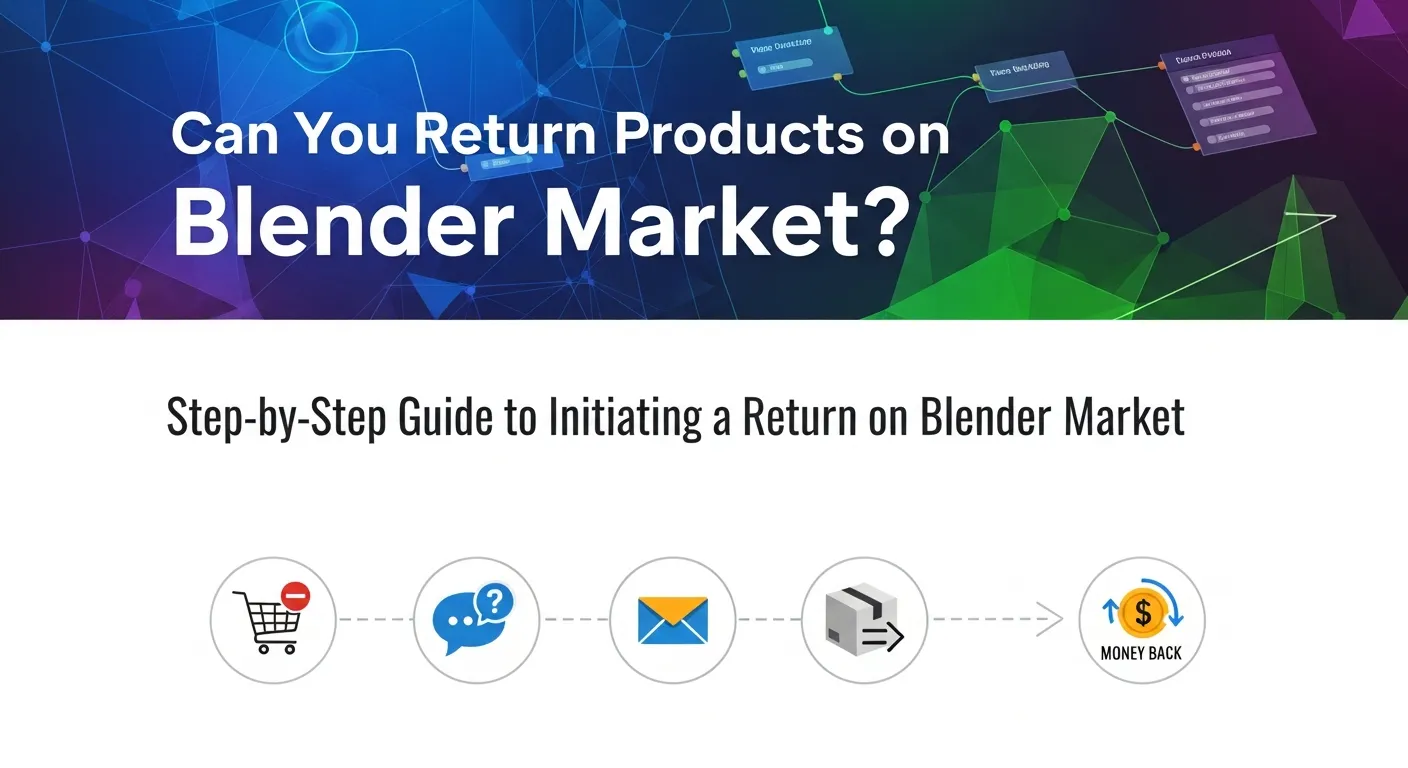
If you’ve determined that your situation qualifies for a return, follow these steps to initiate the process:
1. Review the Return Policy
Before taking any further steps, revisit Blender Market’s official refund policy page to ensure your situation aligns with their requirements. This will save you time and increase the chances of a successful resolution.
2. Contact the Product Creator
Blender Market encourages buyers to first reach out to the creator or developer of the product. Many creators are happy to resolve issues directly, such as providing troubleshooting advice or updates to the product. Creators can reduce return requests by ensuring their listings are clear and appealing — here’s a helpful guide on How to Market Your Product Successfully.
3. Submit a Support Request
If your concerns are not resolved after contacting the creator, your next step is to submit a support request through Blender Market. Here’s how to do it:
- Log in to your Blender Market account.
- Navigate to your purchase history under your account settings.
- Find the relevant product and click on the support or refund request button.
- Provide a detailed explanation of the issue, along with any supporting evidence like screenshots, error messages, or video recordings.
4. Cooperate with the Support Team
Once you’ve submitted your request, the Blender Market support team will review your case. Be prepared to answer follow-up questions or provide additional information. The better you communicate your concerns, the smoother the process will be.
5. Receive Your Refund
If your request is approved, the refund will typically be processed using the original payment method. Refund timelines may vary depending on your payment provider, but it’s usually completed within 5–10 business days.
Common Issues and Solutions
While Blender Market strives to make the process straightforward, you might encounter some challenges. Here are a few common issues and how to address them:
The Product Creator is Unresponsive
If you’ve reached out to the product creator but haven’t received a reply, don’t panic. Contact Blender Market’s support team directly and explain the situation. They can mediate between you and the creator.
Refund Request Denied
Refund requests may be denied if they fall outside the return policy guidelines (e.g., incorrect reasons or expired timeframes). To prevent this, always review the policy before purchasing and submitting a request.
👉 Here’s some research from Harvard Business Review on why consumers return products — it’s a helpful read for both buyers and sellers.
Difficulty Proving the Issue
If the issue is not immediately evident, such as a bug or compatibility error, include as much detail in your request as possible. Screenshots, screen recordings, or detailed descriptions can help substantiate your case.
Payment Processing Delays
Occasionally, payment processing delays may occur after a refund has been approved. If this happens, check with your payment provider to confirm the status of the transaction, or follow up with Blender Market support.
Tips for a Smooth Return Experience
To minimize stress and ensure a hassle-free return process, keep these tips in mind:
- Read the Product Description Carefully
Before purchasing, review the product details thoroughly, including compatibility requirements and user reviews. This reduces the chances of buying something unsuitable for your needs.
- Act Quickly
If you encounter an issue, don’t wait. Submit a return request as soon as possible to stay within the acceptable timeframe.
- Document the Problem
Provide clear evidence of any issues to strengthen your case. The more detailed your explanation, the better.
- Be Polite and Professional
Whether you’re communicating with the product creator or Blender Market support, maintain a respectful tone. Cooperative dialogue often leads to quicker resolutions.
- Revisit Your Needs
If you frequently face returns, take some time to refine your search criteria on Blender Market. Filter products by reviews, ratings, or relevance to ensure better matches for your projects.
Need Help? Here’s Where to Get It
If you’re struggling with a return or need more information about Blender Market’s policies, visit their support page or reach out to their dedicated customer service team. You’ll find helpful resources, FAQs, and direct contact options to resolve your concerns.
Making the Most of Blender Market
Blender Market: Understanding Return Process (Data cite: up to October 2023) By reading their policies, Modifying issues in expeditiously, and communicating well can make your experience on the platform easier.
So if you are a Blender artist or some digital creator searching for good quality tools, be sure to check out the amazing selection on Blender Market. Just remember to save these rules for your next purchase — and if you’re planning to sell as well, here’s a guide on How to Market Digital Products effectively.
Why Blender Market Is Essential for Digital Product Creators
Blender Market isn’t just a place to buy — it’s a thriving hub where digital creators can sell, promote, and refine their work. For developers and 3D artists, it bridges the gap between innovation and visibility in the competitive digital product space.
By understanding your audience and aligning your assets with market demand, you can significantly boost sales and build credibility on Blender Market. Success comes not only from product quality but also from how you position your work in the product market.
Key Benefits for Digital Product Sellers on Blender Market
-
Global Reach: Access to thousands of Blender users and professionals.
-
High Market Demand: Constant need for tools, add-ons, and materials that save time or enhance workflow.
-
Community Feedback: Direct access to authentic customer feedback for continuous improvement.
-
Fair Revenue Share: Blender Market provides transparent earning models for creators.
-
Supportive Ecosystem: Active community and tutorials to help sellers improve their product marketing strategy.
Table: Advantages of Selling Digital Products on Blender Market
| Feature | Benefit for Creators |
|---|---|
| Niche Audience | Focused Blender user base ensures targeted sales and visibility. |
| Customer Feedback System | Receive direct input to enhance product quality and reduce refund requests. |
| Revenue Transparency | Clear breakdown of commissions and payments for trust and accountability. |
| Community Support | Engage with experienced 3D artists and developers for collaboration opportunities. |
| Market Demand Insights | Monitor trends to create in-demand digital assets and stay ahead in the product market. |
By leveraging these tools and features, creators on Blender Market can grow their presence, understand what customers truly want, and create products that meet evolving market demand.
How to Improve Sales and Reduce Returns on Blender Market

For sellers, minimizing refunds while maximizing sales depends heavily on a strong product marketing strategy. Every creator on Blender Market can enhance their reputation and income by focusing on clarity, communication, and customer experience.
Effective Product Marketing Tips for Blender Market Creators
-
Understand Your Market Demand
Study the types of products that are currently trending. Create assets that solve real problems for 3D designers and match user expectations. -
Write Detailed Descriptions
Use accurate, transparent details in your listings — including compatibility, use cases, and updates. This builds trust and reduces confusion. Click Here Build Trust the Way to Market Any Product -
Encourage Honest Customer Feedback
Request buyers to share their experiences. This helps identify weaknesses and improve your digital product offerings. -
Offer Continuous Updates
Regularly improve your product based on feedback and Blender version changes. Updated tools remain relevant longer in the product market. -
Maintain Professional Communication
Respond promptly and respectfully to support messages. Quick resolutions and a polite tone often turn refund requests into positive reviews.
Table: Comparison — Poor vs. Strong Product Marketing Strategy
| Aspect | Weak Strategy | Strong Strategy |
|---|---|---|
| Product Description | Vague, missing compatibility info | Clear, detailed, highlights benefits and requirements |
| Visual Presentation | Low-quality previews or no demo | High-quality renders, demo videos, and usage examples |
| Customer Interaction | Slow or unhelpful responses | Quick, polite, and solution-oriented communication |
| Product Updates | Rarely updated after launch | Regular updates and bug fixes to match user market demand |
| Feedback Utilization | Ignores customer suggestions | Uses customer feedback to improve and relaunch products |
By maintaining a strong product marketing strategy, sellers can gain loyal customers, fewer refund requests, and higher rankings on Blender Market. Continuous learning and engagement are key to staying relevant in this fast-changing digital product environment.
Frequently Asked Questions (FAQ)
1. Can I return a product purchased from Blender Market?
Yes, you can return most products on Blender Market if they meet the return policy conditions, such as being defective or not as described.
2. How long do I have to request a refund?
You typically have 14 days from the date of purchase to submit your refund request.
3. What if I just changed my mind after buying?
A change of mind doesn’t usually qualify for a refund unless the product explicitly allows it. Always review product descriptions carefully.
4. How do I contact the product creator on Blender Market?
You can message the creator directly through the product’s support section on your Blender Market account.
5. What happens if the creator doesn’t respond?
If the creator is unresponsive, contact Blender Market Support — they’ll help mediate and resolve your issue.
6. Can I return a product after using it?
If you’ve downloaded and used the product but found a legitimate defect or incompatibility, you can still request a refund within the timeframe.
7. How will I receive my refund?
Refunds are processed through the same payment method used during purchase, usually within 5–10 business days.
8. Are all products eligible for refunds?
No. Items labeled non-refundable or those purchased outside the return period are ineligible.
9. What if my refund request is denied?
If denied, review the policy for clarification. You may appeal by providing more evidence or contacting support.
10. How can sellers reduce refund requests?
Sellers can use a solid product marketing strategy — clear descriptions, transparent previews, and accurate compatibility details — to minimize return rates.
11. Does customer feedback affect refunds?
Yes. Honest customer feedback helps both creators and buyers improve the product market experience, influencing product quality and policy updates.